Accessibility support in the tvOS (Apple TV) experience is always enabled. There is no separate accessibility mode.
This guide describes what is available for Focus Engine (Siri Remote), VoiceOver, and screen-reader users across browsing, search, account flows, schedules, and video playback.
Related: ADA & Accessibility Support (Web) · ADA & Accessibility Support (iOS)
1. Global page accessibility
Headings
- A screen-level heading is available for assistive technology where implemented (for example hero titles such as Presidents Cup or Anna Pigeon, and player titles).
- Tray and section titles can use clear heading levels (for example Featured, Featured Networks, Live & Upcoming, Seasons).
Visible focus
- Interactive controls show a clear focus state for Siri Remote navigation (red highlight on menu items and date controls; white focus ring on program cards and CTAs).
- Focus styling works across menus, trays, program guide, settings, and player panels.
- When VoiceOver is on, it speaks the element that currently has focus.
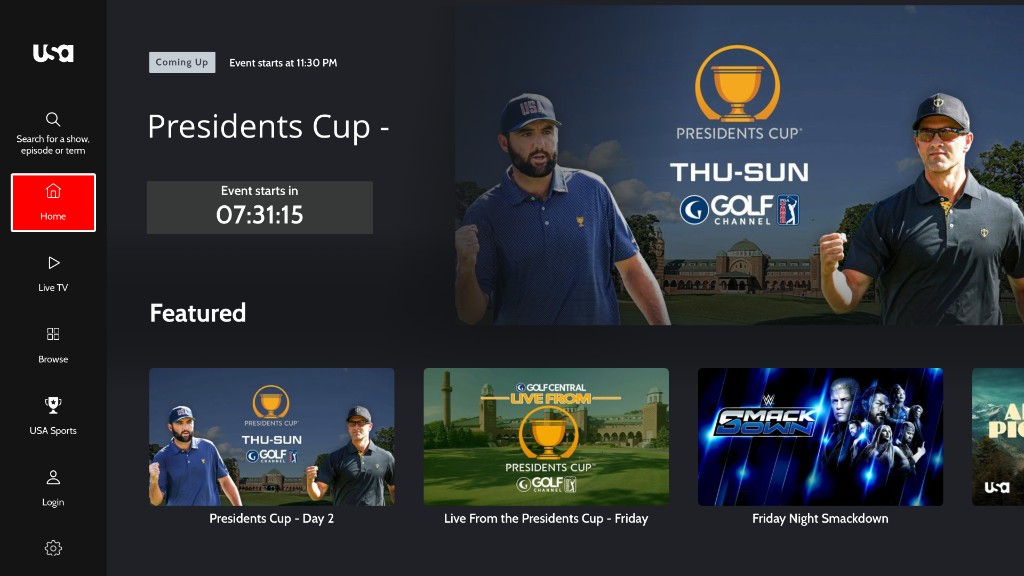
Figure 1. Visible focus on the left-menu Home item during Siri Remote navigation; Coming Up hero and Featured tray on the right.
Accessible names and roles
- Icon-only and text-light controls have accessible names (for example Search, Settings, Subtitles, Play, Slow Mo, Start from beginning).
- Custom controls use appropriate traits such as button, header, adjustable (playback slider), and tabBar (left menu).
- Decorative loaders and redundant visuals are removed from the accessibility tree so they are not announced as meaningful images.
2. Images (accessibility labels)
- Informative images use descriptive accessibility labels (logos, content titles, provider names, channel logos, QR codes for activation).
- Decorative or redundant images are hidden from VoiceOver when a parent control already has a full accessible name (for example schedule tiles), so screen readers are not given duplicate announcements.
3. VoiceOver attributes (catalog)
Naming and description
| Attribute | Use |
|---|---|
| Accessibility label | Accessible names on icon buttons, tiles, logos, providers, search, and actions |
| Accessibility hint | Additional usage context where applied |
| Accessibility value | Toggle state (On/Off), Selected / Unselected Tab, slider percent, selected caption option |
State and relationship
| Pattern | Use |
|---|---|
| Selected / Unselected Tab | Left menu destinations (Home, Live TV, Browse, Search, Settings) |
| On / Off | Subtitles and similar toggles (stable label + value) |
| Selected for {setting} | Caption / audio / quality options (for example “Off, selected for Closed Captions”) |
| Announcement | Live updates (search result counts, TVE provider counts, Customer Care) |
| Hidden / not an element | Decorative visuals when a parent label already conveys meaning |
| Preferred focus / focus guides | Keeps remote focus inside player settings, CC panels, EPG, and overlays |
Traits commonly used
| Trait / pattern | Use |
|---|---|
| Button | Tiles, CTAs, player controls, account rows, provider / activation actions |
| Header | Titles and section headings |
| Adjustable | Playback slider |
| Tab bar | Primary left-menu items |
| Static text | Metadata rows that should be read but not activated as buttons |
4. Focus Engine, remote, and VoiceOver
Remote actions
| Input | Behavior |
|---|---|
| Swipe (Siri Remote) | Move focus through controls; dialogs and panels may keep focus inside while open |
| Click / select | Activate custom buttons, tiles, menus, and similar controls |
| Menu / Back | Dismiss overlays and return focus where implemented |
Focus management
- Settings and closed-caption panels use focus guides so focus stays on relevant options.
- Lists can remember the last focused index where implemented.
- Preferred focus environments restore logical starting points in player and menu flows.
Areas with Focus / VoiceOver support
Header and logo, search, left navigation and profile / account, trays and carousels, schedule tiles, program guide, TV-provider selection, settings and account actions, watchlist / like / share, and player controls / captions.
5. Accessibility by area
Header and navigation
- Logo and left-menu controls are labeled and focus-operable (Search for a show, episode or term, Home, Live TV, Browse, USA Sports, Login, Settings).
- Menu items expose Selected Tab / Unselected Tab values with tab-bar traits.
- App logo can announce the app name; connected TVE branding (for example optimum.tv) can appear in the menu footer.
- Selected menu items use a high-visibility highlight (for example red background on the focused tab).
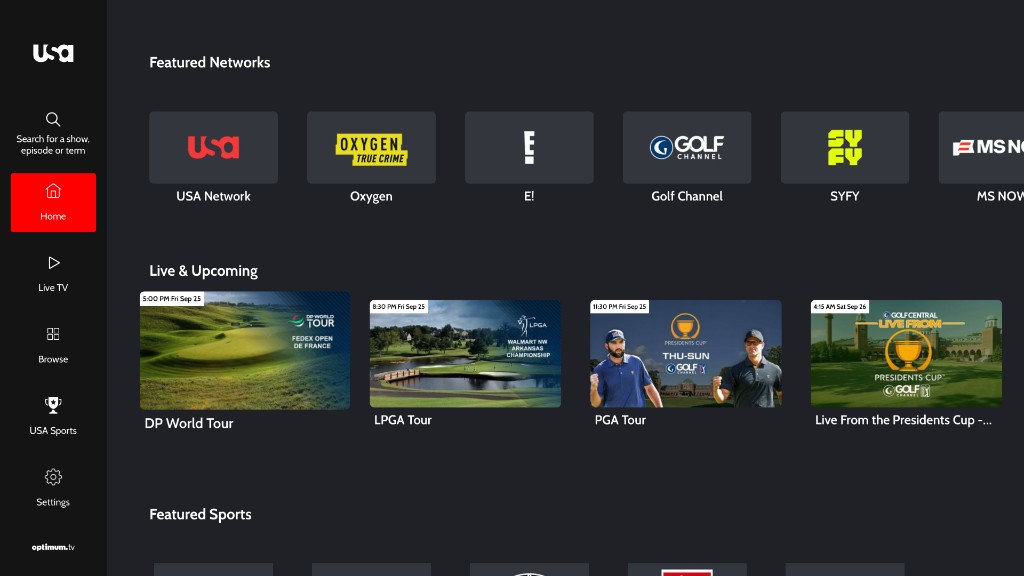
Figure 2. Header / left navigation with Home selected; Featured Networks and Live & Upcoming trays in the main area.
Search
- Search field and on-screen keyboard actions are labeled and focus-operable.
- Category filters (Top Results, Videos, Episodes) expose the active view.
- Related-title lists (Search titles related to:) and result cards are focus-activable and use content titles for accessible names.
- Result counts can be announced when VoiceOver is running.
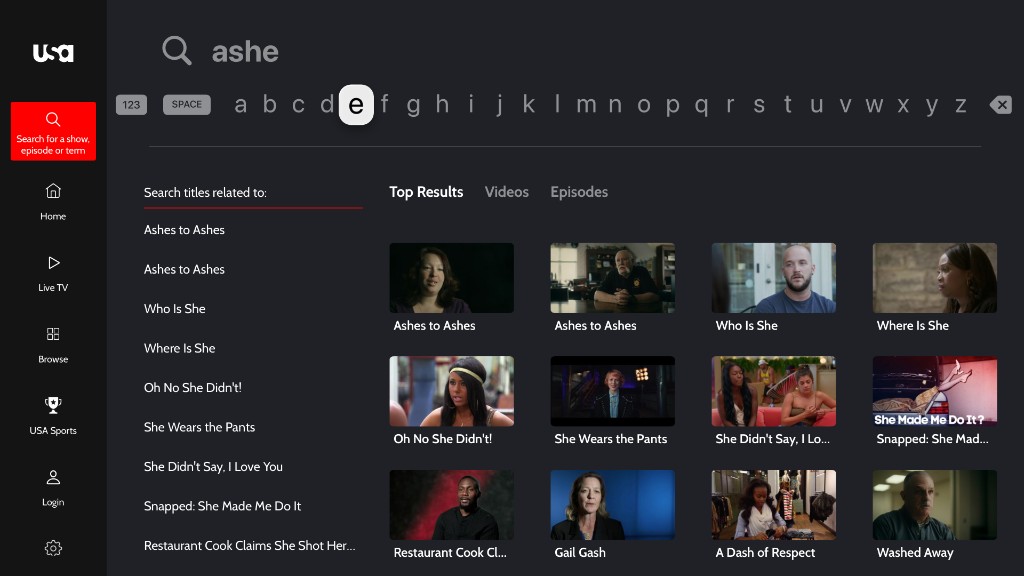
Figure 3. Search field, on-screen keyboard, related titles, and Top Results grid used with Focus / VoiceOver; Search menu selected.
Home, trays, and carousels
- Carousels support Focus Engine use and accessibility labeling.
- Tray items and primary CTAs have accessible names.
- Section headings (Featured, Featured Networks, Live & Upcoming, Featured Sports) are available as headings where implemented.
- Watchlist, like, and share actions are focus-operable where offered.
- Live / upcoming tiles can include time / date badges in rich spoken labels.
- Clip tiles can speak title, badge, season / episode, and duration in one phrase.
Schedule and live listings
- Live TV landing shows LIVE status, program title, progress, and schedule entry points.
- Date control (Today) is labeled and focus-operable.
- Schedule / On Now program cards use rich screen-reader labels covering title, rating, description, and time when relevant.
- Decorative tile visuals can be hidden from the accessibility tree to avoid duplicate speech.
- Tiles and related actions are focus-operable.
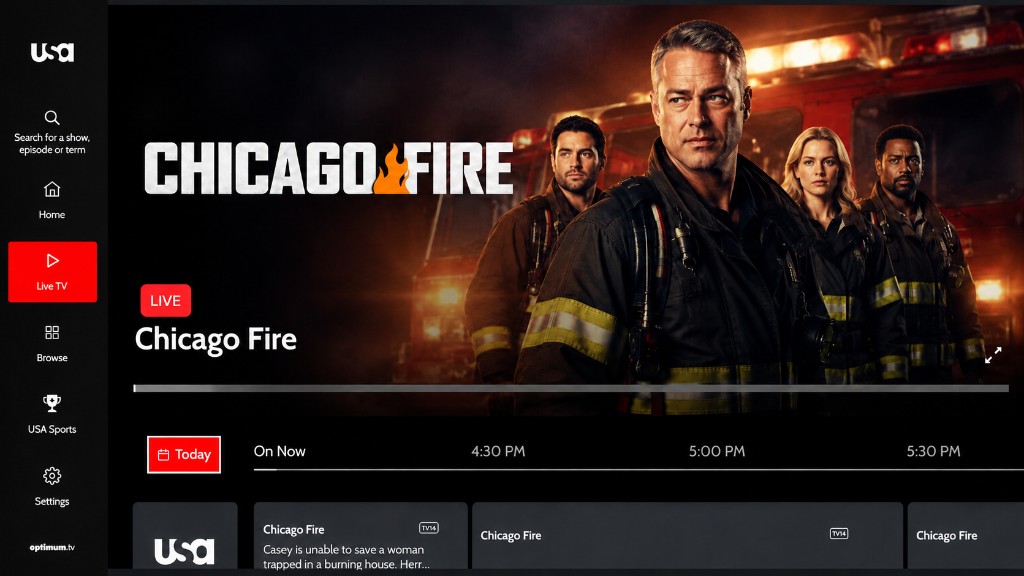
Figure 4. Live TV schedule — LIVE badge, current program title, Today date control (focused), On Now timeline, and program cards.
Program guide
- Channel identification (for example USA logo tile) and program tiles are focus-activable.
- Program tiles announce title, rating, description, and time slot where implemented.
- Time headers (On Now, half-hour slots) provide schedule context for assistive technology.
- Focus rings on the active program card and red highlight on Today / Live TV make the current remote target clear.
- Focus guides keep remote movement predictable across the guide where implemented.
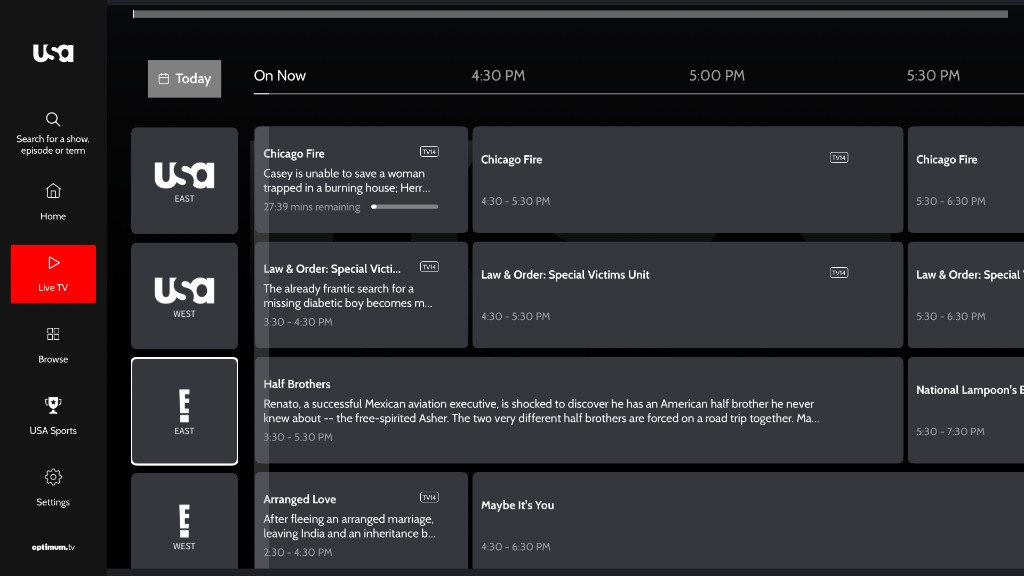
Figure 5. Program guide grid — Today / On Now headers, channel column (focus on a channel tile), and program cards with titles, ratings, times, and remaining time; Live TV menu selected.
Video and show detail
- On-page metadata (title, description, rating, seasons) is labeled for assistive technology.
- Primary CTAs (for example Resume S1:E1) are labeled buttons with a clear focus ring.
- Season selectors expose selected state (for example Season 1 in accent color).
- Episode thumbnails are focusable; NEW badges are included in spoken labels where implemented.
- Watchlist, like, share, and related actions are focus-operable where offered.
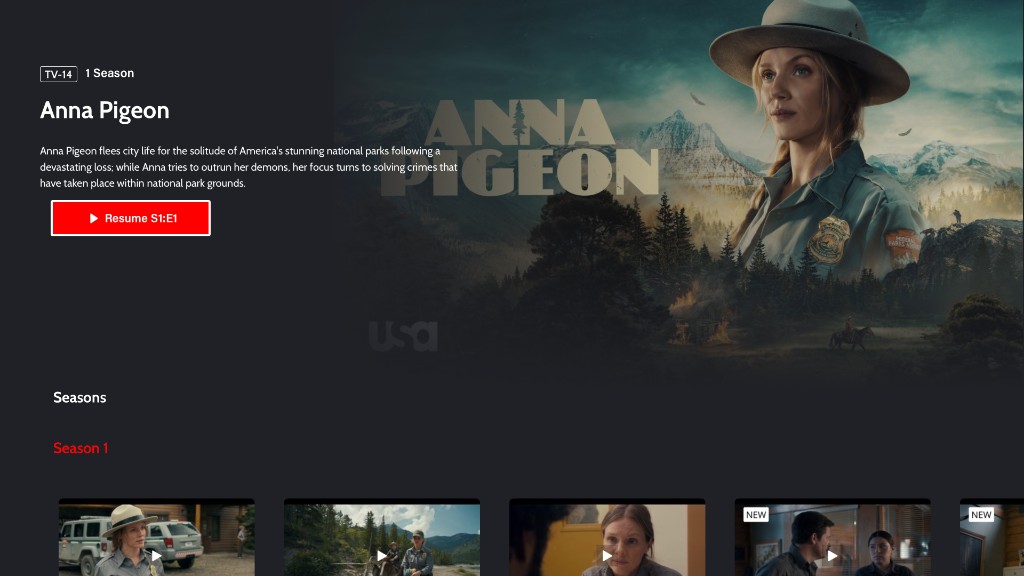
Figure 6. Show detail — rating, title, description, Resume CTA (focused), Seasons heading, and episode tray.
Account, forms, checkout, and settings
- Form fields and actions have accessible names where implemented.
- Device activation / pairing fields and submit controls are labeled where offered.
- Checkout and plan CTAs are labeled; Focus order is supported through account flows where implemented.
- Customer Care can announce contact details and move VoiceOver focus to the content region.
TV provider login
- Sign in with tv provider screen title and instructional copy are available to VoiceOver.
- Activation URL, activation code, and Get New Code are labeled; the code is spoken as text.
- QR activation instructions and QR image use descriptive labeling (for example QR code to scan for activation).
- Provider search / picker flows (where offered) use provider names on tiles and can announce result counts.
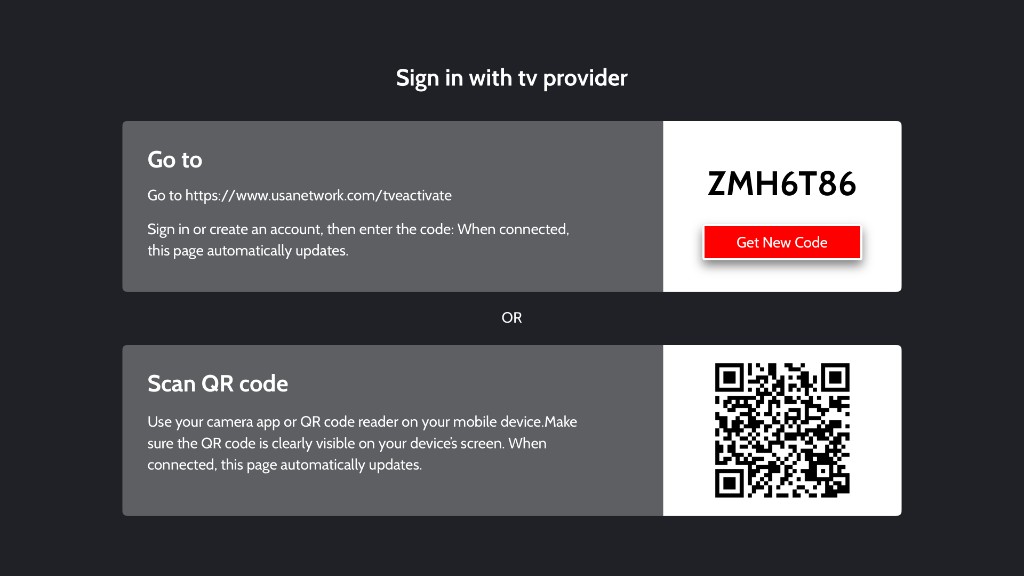
Figure 7. TV provider sign-in — activation URL and code, Get New Code action, and QR scan path.
Modals and overlays
- Account and related overlays use focus guides and labeled dismiss actions where implemented.
- Settings panels restore or keep focus on the intended controls when opened.
6. Video player accessibility
Captions and subtitles
- Closed captions / subtitles can be loaded, labeled by language, turned on or off, and selected from captions or settings panels.
- The captions / subtitles control is focus-operable from the player chrome.
- Caption options announce selection in context (for example Off, selected for Closed Captions).
- A dedicated Closed Captions selection experience supports Focus Engine navigation where offered.
Controls and live status
Accessible player controls include:
| Control (as shown) | Spoken / accessible behavior |
|---|---|
| Title | Heading where set (for example content title at top of skin) |
| Play / Pause | Play / Pause |
| Playback slider | Playback slider, percent value, adjustable trait |
| Current / total time | Spoken time values (for example 00:11 and 16:53) |
| Slow Mo | Slow motion |
| Captions icon | Subtitles with value On / Off |
| Settings (gear) | Player settings |
| Start from beginning | Start from beginning |
| Live / Watch live / Skip intro / Share / Like / Multiview | Labeled where offered on the skin |
Live playback can show LIVE / Watch live status. Seek controls expose progress values for assistive technology.
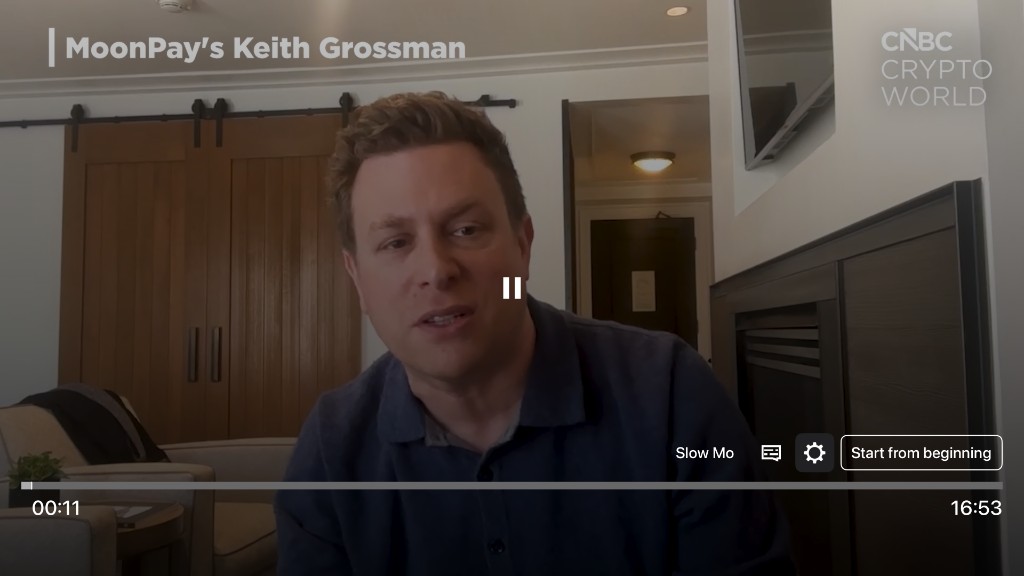
Figure 8. Player captions / controls — title, Play/Pause, playback slider and time, Slow Mo, Captions, Settings, and Start from beginning.
Focus / VoiceOver interaction notes
- Title can use heading level 1.
- Focus guides keep remote navigation inside settings and CC panels.
- Preferred focus returns to primary playback controls after layout updates where implemented.
7. Coverage summary
| Area | Labels / traits | VoiceOver | Images | Focus | Captions |
|---|---|---|---|---|---|
| Headings & global model | Yes | Yes | — | Yes | — |
| Header / nav / search | Yes | Yes | Logo / result labels | Yes | — |
| Trays / carousels | Yes | Yes | Mixed | Yes | — |
| Schedule / Live TV | Rich tile labels | Yes | Often hidden by design | Yes | — |
| Program guide | Channel + program labels | Yes | Channel labels | Focus rings / guides | — |
| Detail pages | Metadata + actions | Yes | Mixed | Yes | Page + player |
| Account / checkout | Field & CTA labels | Announcements | Where needed | Yes | — |
| TV provider / modals | Code, QR, names | Yes | QR / provider | Focus guides | — |
| Video player | Control & slider labels | Yes | Episode / thumb | Preferred focus | Yes |
8. Summary of accessibility themes
- Accessible names — labels on icon and custom controls
- Image text alternatives — descriptive labels for informative images; tree exclusion for decorative / redundant images
- Focus Engine support — Siri Remote swipe and select on interactive UI
- Focus clarity — visible focus rings and preferred focus / focus guides
- Dialog / panel safety — focus kept inside settings and CC overlays where implemented
- State disclosure — selected tabs, On/Off, and related accessibility values
- Rich screen-reader copy — especially schedule and program-guide tiles
- Player media accessibility — captions, labeled controls, adjustable seek, live status, and accessible in-player selectors
9. Out of scope for this document
- Web / browser and iPhone / iPad platforms (see companion ADA guides)
- Formal legal certification or WCAG / App Store Accessibility Nutrition Label claims
10. Closing note
Accessibility support combines screen-level improvements (navigation, labeling, Focus Engine access, and VoiceOver speech) with video player support (captions, control labels, adjustable seek, and in-player panels). Together, these make core browse, search, account, schedule, and playback journeys usable with the Siri Remote and VoiceOver.