Overview
View a customer's personal information, recent activity, and location details after opening their account from search.
:::tip At a Glance
Who is this for?
Support agents reviewing customer account details.
When do I use this?
After finding a customer via search — the Profile tab is selected by default.
What will happen?
You'll see the customer's personal data, location, and quick-action buttons for common tasks.
:::
Steps
Step 1: Open a customer from search
Search for a customer and click their row to open the detail view. The Profile tab loads automatically.
Step 2: Review personal information
The profile section shows:
| Field | Editable | Notes |
|---|---|---|
| Name | Yes | Saved on blur if changed |
| No | Verified email, read-only | |
| Unverified Email | — | Shows with "Verify Now" button |
| Phone Number | No | Verified phone, read-only |
| Unverified Phone | — | Shows with "Verify Now" button |
| Provider | No | Authentication provider |
| Country / City | No | Derived from IP or manual override |
| Timezone | No | Derived from location |
| Postal Code | No | Derived or overridden |
| Registration IP | No | IP at time of sign-up |
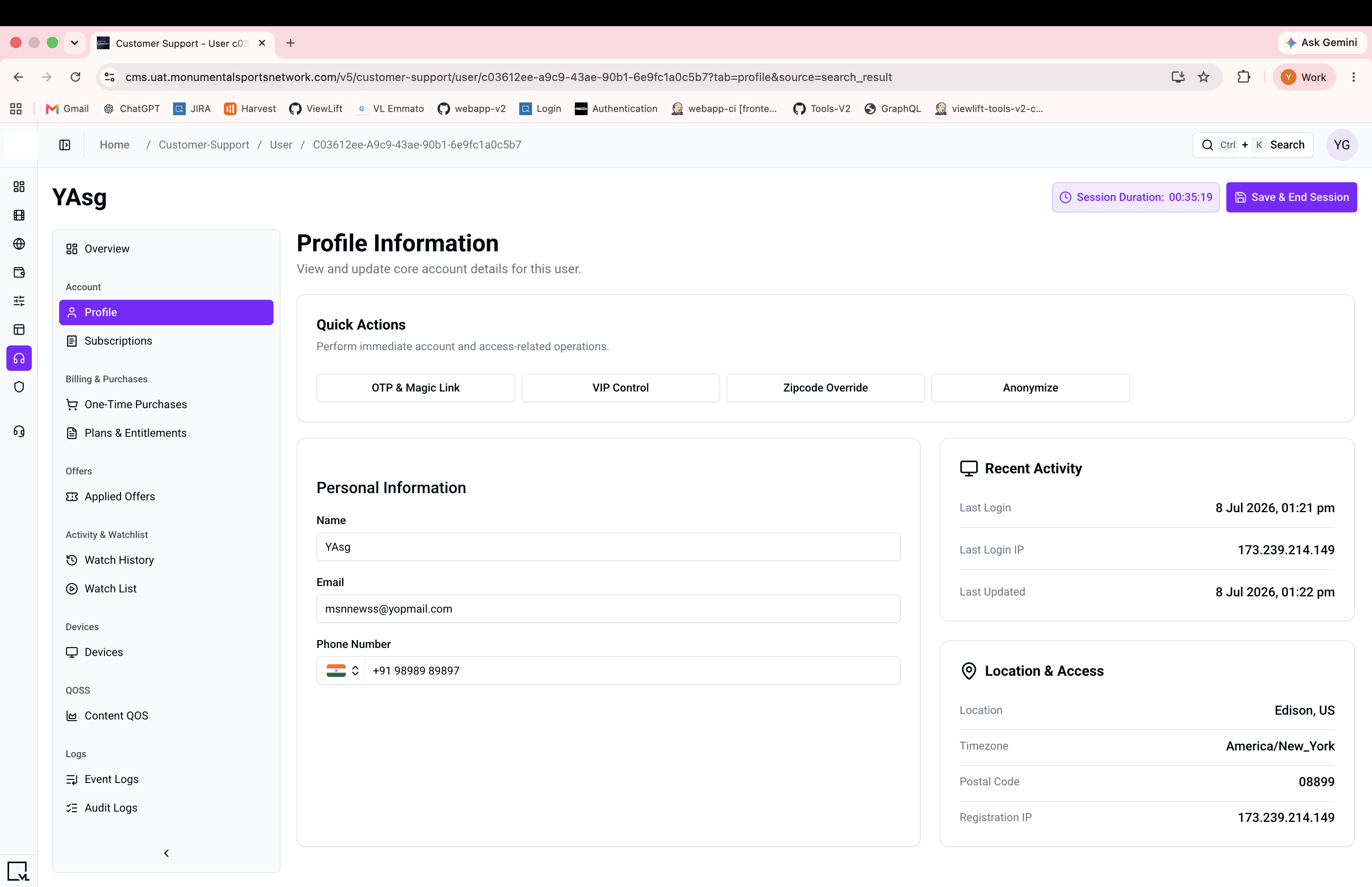
Step 3: Use quick actions
The profile page includes quick-action buttons for:
- Generate OTP or magic link
- Manage VIP status
- Override zipcode
- Anonymize a user
- Deactivate an account
Step 4: Verify an unverified email or phone (if present)
If the customer has an unverified email or phone number, a Verify Now button appears next to the field. Click it to mark the value as verified.
Expected Behavior
- Profile data loads immediately when the customer detail page opens.
- Editable fields save automatically when you move focus away (on blur), but only if the value changed.
- Quick actions open as dialogs over the current page.
If Something Goes Wrong
- "User not found" after anonymization → This is expected. The account data has been permanently removed.
- Name not saving? → Changes only save on blur. Click outside the field after editing.
Related
- Search for a customer
- Session management