Overview
Choose how customers can claim a subscription offer. The redemption type controls how many times an offer can be used and whether it requires a promotion code.
:::tip At a Glance
Who is this for?
Anyone creating or editing a subscription offer who has reached the Redemption step.
When do I use this?
During Step 4 of the subscription offer wizard — after choosing the offer type and defining the benefit.
What will happen?
The offer's redemption rules are set, determining whether it's a one-time code, a limited-use promo, an open unlimited offer, or a batch of pre-generated coupon codes.
:::
Prerequisites
- You must be creating or editing a subscription offer
- Steps 1–3 (Type, Benefit) must be completed
.png)
Redemption Types
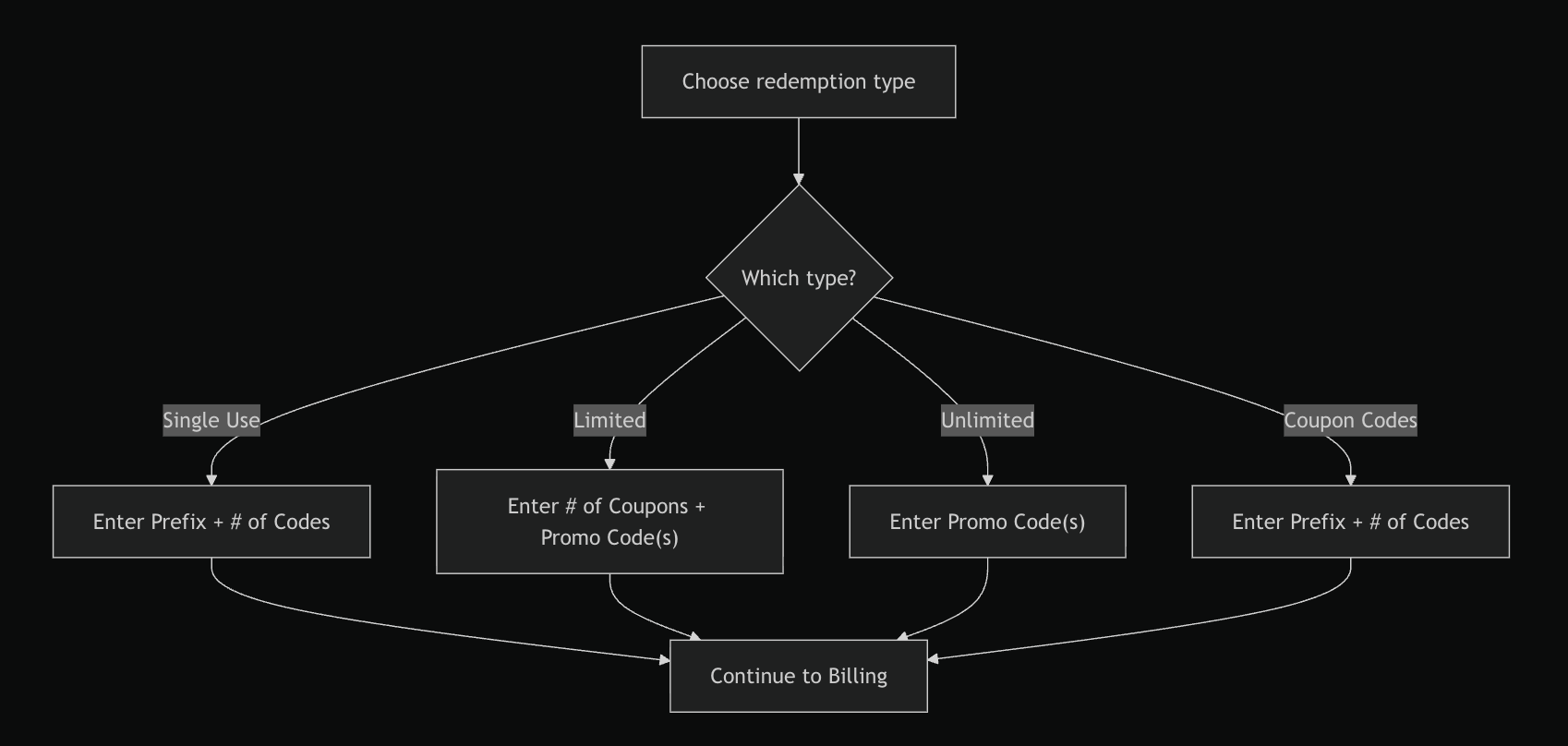
There are four options. Each one reveals different configuration fields.
Single Use
Each generated code can only be redeemed once by one customer.
| Field | Description |
|---|---|
| Prefix | A short string prepended to all generated codes |
| # of Codes | Total number of unique codes to generate |
Best for: Large promotional campaigns where each recipient gets a unique code — e.g. codes printed on physical cards or sent in individual emails.
Limited Uses
A single promotion code that can be redeemed a fixed number of times.
| Field | Description |
|---|---|
| Number of Coupons | Maximum number of times the code can be redeemed |
| Promotion Code | The actual code customers will enter |
You can add multiple promotion codes to the same offer. Type a code and press Add — each code appears in a list and can be removed individually.
Best for: Partner promotions or team offers — e.g. "Use code PARTNER50 — first 200 customers get 50% off".
Unlimited
A promotion code with no redemption cap. Anyone who knows the code can use it.
| Field | Description |
|---|---|
| Promotion Code | The code customers will enter |
Same multi-code support as Limited — you can add several codes.
Best for: Public promotions — e.g. a code published on social media or a landing page.
Coupon Codes
A batch of pre-generated codes, each redeemable once. Similar to Single Use but identified as coupon-style codes.
| Field | Description |
|---|---|
| Prefix | A short string prepended to all generated codes |
| # of Codes | Total number of unique codes to generate |
Best for: Gift cards, voucher campaigns, or any scenario where you need a list of individual-use codes to hand out.
Comparison
| Feature | Single Use | Limited | Unlimited | Coupon Codes |
|---|---|---|---|---|
| Code generated? | Yes | Manual | Manual | Yes |
| Redemption cap | 1 per code | Custom | None | 1 per code |
| Multiple codes | Batch | Yes | Yes | Batch |
| Requires # of Codes | Yes | No | No | Yes |
| Requires Promo Code | No | Yes | Yes | No |
Switching Between Types
:::warning
Switching the redemption type resets any previously entered values for that step — including promotion codes, coupon counts, and campaign tags. This prevents stale values from carrying over to the wrong configuration.
:::
Flow
If Something Goes Wrong
- Can't find the redemption step? → This step is only available in the subscription offer wizard (not transactional).
- Promo codes disappeared after switching type? → That's expected. Switching types clears previous entries. Re-enter the codes for the new type.
Related
- Create a subscription offer
- Set offer availability