Tour Manager
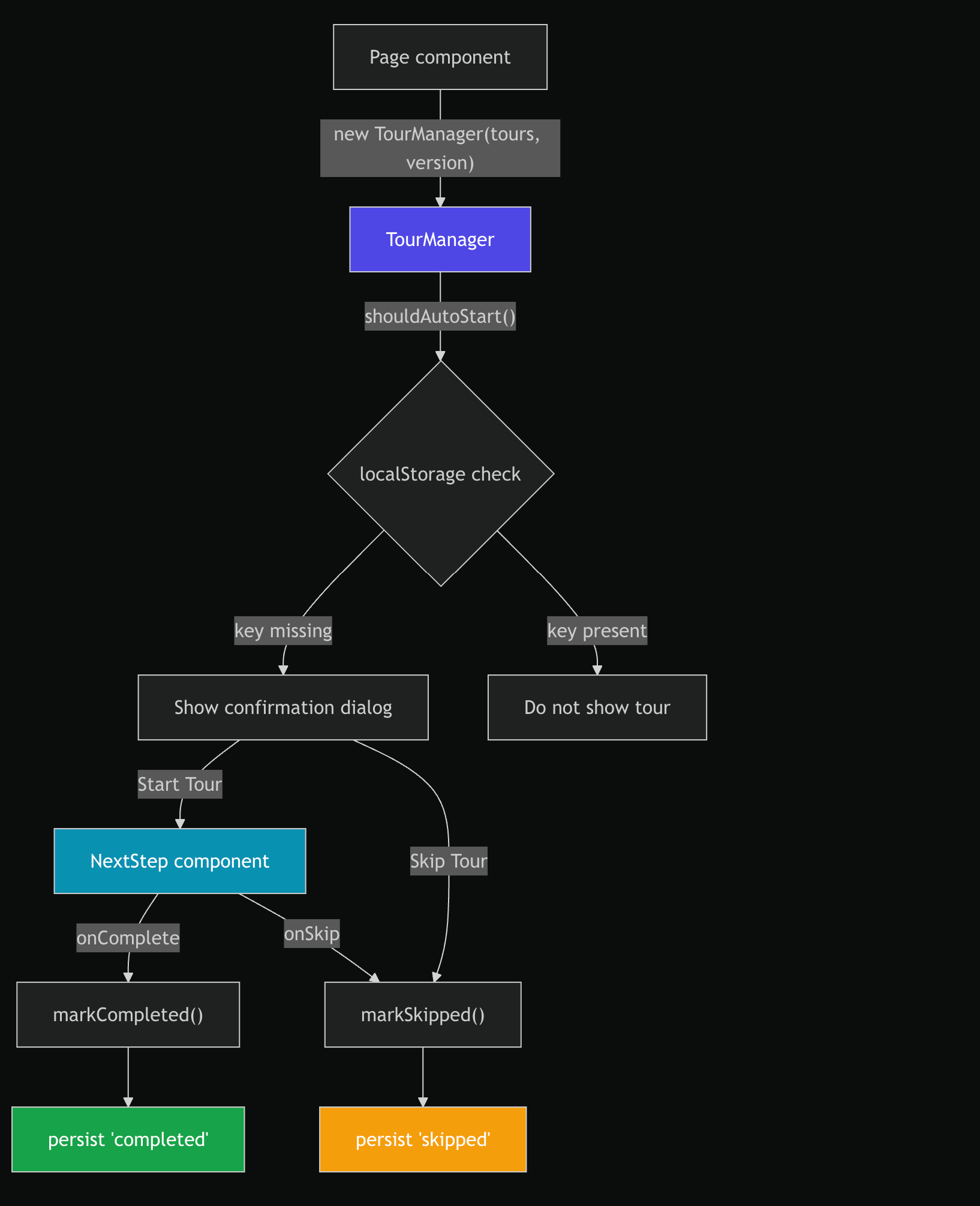
The TourManager class orchestrates guided product tours — step-by-step onboarding and feature discovery flows within the CMS. It wraps NextStepJS with versioned persistence so tours auto-start for new users and stay dismissed for returning users.
How It Works
API
import { TourManager } from '@/lib/internal/TourManager';
import DASHBOARD_TOUR from '@/config/tours/dashboard';

const manager = new TourManager(DASHBOARD_TOUR, 1.1);

manager.shouldAutoStart(); // true if localStorage key is absent (first visit)
manager.getTours(); // returns the Tour[] array for NextStepJS
manager.markCompleted(); // persists 'completed' to localStorage
manager.markSkipped(); // persists 'skipped' to localStorage
Constructor
constructor(tours: Tour[], version: number)
| Parameter | Type | Purpose |
|---|---|---|
tours |
Tour[] (from nextstepjs) |
Array of tour step definitions |
version |
number |
Version number — changing this resets the tour for all users |
The storage key is derived as tour:{tourName}:v{version}, where tourName comes from tours[0].tour. For example, DASHBOARD_TOUR with version 1.1 produces the key tour:dashboard:v1.1.
Persistence
| Key Pattern | Storage | Values |
|---|---|---|
tour:{name}:v{version} |
localStorage |
'completed' or 'skipped' |
shouldAutoStart() checks whether the key exists — if absent, the tour has never been shown. Bumping the version parameter creates a new key, effectively resetting the tour for all users without clearing old entries.
SSR-safe: shouldAutoStart() returns false when typeof window === 'undefined'.
Tour Definitions
Tours are defined in src/config/tours/ and re-exported via src/config/tours/registry.ts:
// src/config/tours/dashboard/index.ts
const DASHBOARD_TOUR: Tour[] = [
  {
    tour: 'dashboard',
    steps: [
      {
        icon: '...',
        title: 'Video Errors',
        content: 'Monitor your video errors and track issues in real time here.',
        selector: '#video-error-widget',
        side: 'right',
        showControls: true,
        showSkip: true,
      },
      // ... more steps
    ],
  },
];
Each step targets a DOM element via CSS selector. The side property controls tooltip placement (top, bottom, left, right).
Current Tours
| Tour | Key | Version | Steps | Location |
|---|---|---|---|---|
| Dashboard | dashboard |
1.1 | 4 | src/config/tours/dashboard/index.ts |
NextStepJS Integration
The tour system uses three NextStepJS components:
| Component | Location | Purpose |
|---|---|---|
NextStepProvider |
Route layout (overview/layout.tsx) |
Provides tour context to child components |
NextStep |
Page component (overview/page.tsx) |
Renders the tour overlay with steps, callbacks |
useNextStep |
Page component | Hook providing startNextStep(tourName) |
A custom card component (src/components/decorators/CustomCard.tsx) renders each step with:
- Step title and content
- Progress indicator (
currentStep + 1 / totalSteps) - Back / Next / Skip / Finish buttons
- Arrow pointer to the target element
Usage Pattern
The dashboard page demonstrates the standard integration:
// 1. Create manager with tour and version
const manager = useMemo(() => new TourManager(DASHBOARD_TOUR, 1.1), []);

// 2. Check on mount if tour should auto-start
useEffect(() => {
  if (manager.shouldAutoStart()) {
    setTimeout(() => showConfirmationDialog(), 2000);
  }
}, [manager]);

// 3. On confirmation → start the tour
startNextStep('dashboard');

// 4. Wire callbacks
<NextStep
  steps={manager.getTours()}
  onComplete={() => manager.markCompleted()}
  onSkip={() => manager.markSkipped()}
  cardComponent={CustomCard}
  shadowOpacity="0.5"
  shadowRgb="0, 0, 0"
/>
The 2-second delay ensures DOM elements are rendered before the tour tries to target them.
Adding a New Tour
- Create a tour definition file in
src/config/tours/{name}/index.ts - Export it from
src/config/tours/registry.ts - In the target page layout, wrap with
<NextStepProvider> - In the target page component:
- Create a
TourManagerinstance with the tour and a version - Check
shouldAutoStart()on mount - Wire
onComplete→markCompleted()andonSkip→markSkipped()
- Create a
Resetting a Tour for All Users
Bump the version parameter:
// Before: users who completed the tour have key "tour:dashboard:v1.1"
const manager = new TourManager(DASHBOARD_TOUR, 1.1);

// After: new key "tour:dashboard:v1.2" — no one has this yet
const manager = new TourManager(DASHBOARD_TOUR, 1.2);
Old keys remain in localStorage but are inert — shouldAutoStart() only checks the current version key.
Design Decisions
- Version-keyed persistence — changing the version resets the tour for everyone without migrations or backend coordination
- Confirmation dialog before start — tours don't hijack the page unexpectedly; users opt in or explicitly skip
completedvsskippedtracking — distinguishes intentional completion from dismissal, enabling future analytics- No cleanup of old keys — old version keys are harmless and avoiding cleanup keeps the logic simple
- Custom card component — decouples tour step UI from NextStepJS defaults, allowing consistent CMS styling