Theme Manager
The ThemeManager is a static utility class that handles theme computation, application, and persistence for the CMS interface. It supports three modes — light, dark, and system — and resolves the system preference against the browser's prefers-color-scheme media query.
Theme Modes
type ThemeType = 'light' | 'dark' | 'system';
| Mode | Behavior |
|---|---|
light |
Forces light theme regardless of OS preference |
dark |
Forces dark theme regardless of OS preference |
system |
Resolves to light or dark based on prefers-color-scheme: dark |
A pre-built options array is exported for use in UI selectors:
const ThemeOptions: OptionType<ThemeType>[] = [
  { label: 'Light', value: 'light' },
  { label: 'Dark', value: 'dark' },
  { label: 'System', value: 'system' },
];
Theme Toggle Logic
computeNextTheme(current, prefersDark) cycles through themes with a single-click toggle pattern:
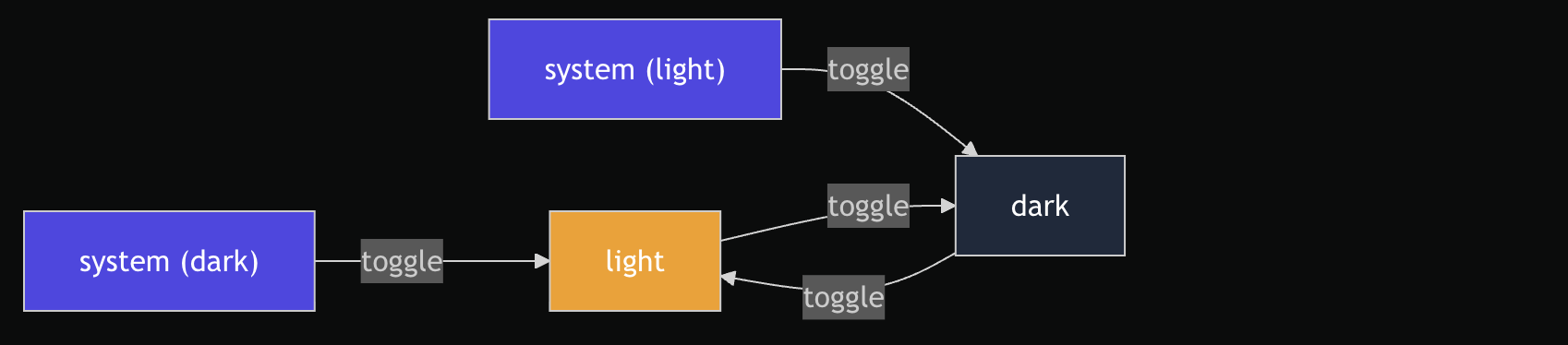
The key insight: when the current theme is system, toggling flips away from the system preference so the user sees an immediate visual change. If the OS prefers dark and the user clicks toggle, they get light — not the visually identical dark.
| Current | OS Prefers Dark | Next Theme |
|---|---|---|
system |
true |
light |
system |
false |
dark |
light |
— | dark |
dark |
— | light |
Applying a Theme
applyTheme(nextTheme, options?) performs three actions:
- Resolves whether the effective theme is dark:
darkmode → dark,systemmode → defers toprefersDark - Toggles the CSS class: adds or removes the
darkclass ondocument.documentElement - Persists the choice: writes the theme to
localStorageunder the keyvlone-theme
ThemeManager.applyTheme('dark');
// → classList.add('dark'), localStorage.setItem('vlone-theme', 'dark')
// → returns 'dark'

ThemeManager.applyTheme('system');
// → resolves based on prefers-color-scheme
// → returns 'dark' or 'light' (the resolved visual theme)
Returns the resolved visual theme ('dark' or 'light') — useful for updating UI state after application.
SSR Safety
All browser APIs are guarded behind typeof checks:
const options = {
  documentRef: typeof document !== 'undefined' ? document : null,
  storage: typeof localStorage !== 'undefined' ? localStorage : null,
  prefersDark:
    typeof window !== 'undefined' ? (window.matchMedia?.('(prefers-color-scheme: dark)').matches ?? false) : false,
};
This makes applyTheme safe to call during server-side rendering — it becomes a no-op when browser globals are unavailable. Each dependency (document, localStorage, window.matchMedia) can also be injected via the options parameter for testing.
Reading Stored Theme
getStoredTheme(storage?) reads the persisted theme from localStorage:
const theme = ThemeManager.getStoredTheme();
// → 'light' | 'dark' | 'system'
// → defaults to 'system' if nothing is stored
The storage parameter can be injected for testing. If localStorage is unavailable (SSR), returns 'system'.
Persistence
| Key | Storage | Default |
|---|---|---|
vlone-theme |
localStorage |
'system' |
The key is defined in src/constants/keys.ts as Keys.Theme.
API Summary
import { ThemeManager, ThemeOptions, ThemeType } from '@/lib/internal/ThemeManager';

// Compute next theme for toggle button
const next = ThemeManager.computeNextTheme(current, prefersDark);

// Apply theme (resolves system, toggles class, persists)
const resolved = ThemeManager.applyTheme(next);
// resolved: 'dark' | 'light'

// Read persisted theme on page load
const stored = ThemeManager.getStoredTheme();

// Use in a dropdown
ThemeOptions.map(opt => <option value={opt.value}>{opt.label}</option>);
Design Decisions
- Static class — no instantiation needed. All methods are stateless utilities that operate on injected or global references.
systemas default — when no theme is stored, the CMS respects the user's OS preference rather than forcing a specific theme.- Single CSS class strategy — the
darkclass on<html>integrates with Tailwind'sdarkMode: 'class'configuration. Only one class is toggled; absence ofdarkimplies light. - Toggle flips away from current visual —
computeNextThemeensures one click always produces a visible change, even fromsystemmode. - Dependency injection —
document,localStorage, andprefersDarkcan all be overridden via options, enabling both SSR safety and deterministic testing.