Shortcut Manager
The Shortcut Manager is a composable, scope-aware keyboard shortcut engine. It allows different parts of the application to register shortcuts that can be pushed, popped, filtered by feature flags and permissions, and evaluated without conflicts.
Architecture

| Component | File | Responsibility |
|---|---|---|
| ShortcutEngine | engine.ts |
Factory-created façade. Orchestrates registry, scope stack, and resolvers |
| ShortcutRegistry | registry.ts |
Map-based storage of RegisteredShortcut objects. Overwrite-safe re-registration |
| ScopeStack | scopeStack.ts |
Ordered stack of active scopes. push / pop / peek / isActive / getStack |
| ComboMatcher | comboMatcher.ts |
Normalizes KeyboardEvent → deterministic combo string, compares combos |
| Types | types.ts |
All public types: ShortcutScope, ShortcutDefinition, ShortcutEngine, etc. |
| Index | index.ts |
Re-exports createShortcutEngine and all public types |
Type Definitions
type ShortcutScope = string;

type ShortcutDefinition = {
  id: string;
  combo: string;
  description: string;
  scope: ShortcutScope;
  category?: string;
  featureFlag?: string;
  permission?: string;
};

type RegisteredShortcut = ShortcutDefinition & {
  handler: () => void;
};

type ShortcutResolvers = {
  contextResolver: () => ShortcutContext;
  featureFlagResolver?: (flag: string) => boolean;
  permissionResolver?: (permission: string) => boolean;
  allowInEditable?: (combo: string) => boolean; // per-combo override
};

type ShortcutEngine = {
  bootstrap(resolvers: ShortcutResolvers): void;
  register(shortcut: RegisteredShortcut): void;
  unregister(id: string): void;
  pushScope(scope: ShortcutScope): void;
  popScope(scope: ShortcutScope): void;
  handleKeyEvent(event: KeyboardEvent): void;
  getActiveShortcuts(): ShortcutDefinition[];
};
How It Works
1. Bootstrap
The engine must be bootstrapped with resolvers before it can process events. Calling any method that requires resolvers before bootstrap() throws an error.
import { createShortcutEngine } from '@/lib/internal/ShortcutManager';

const engine = createShortcutEngine();

engine.bootstrap({
  contextResolver: () => ({ domain: 'cms', section: 'content', workspaceId: 'ws_1' }),
  featureFlagResolver: (flag) => featureFlags.isEnabled(flag),
  permissionResolver: (perm) => permissions.has(perm),
  allowInEditable: (combo) => combo === 'escape', // let Escape work in inputs
});
All resolver fields except contextResolver are optional. If featureFlagResolver is not provided, any shortcut with a featureFlag will be blocked (not silently allowed). Same for permissionResolver.
2. Register Shortcuts
engine.register({
  id: 'save-content',
  combo: 'meta+s',
  scope: 'content-editor',
  description: 'Save current content',
  category: 'editing',
  featureFlag: 'shortcuts.save',
  permission: 'content.write',
  handler: () => saveContent(),
});
Re-registering the same id overwrites the previous shortcut — this is intentional for lifecycle-safe re-registration in React effects.
3. Manage Scopes
Scopes form a stack. The engine evaluates shortcuts from the top of the stack downward, using the first matching shortcut it finds.
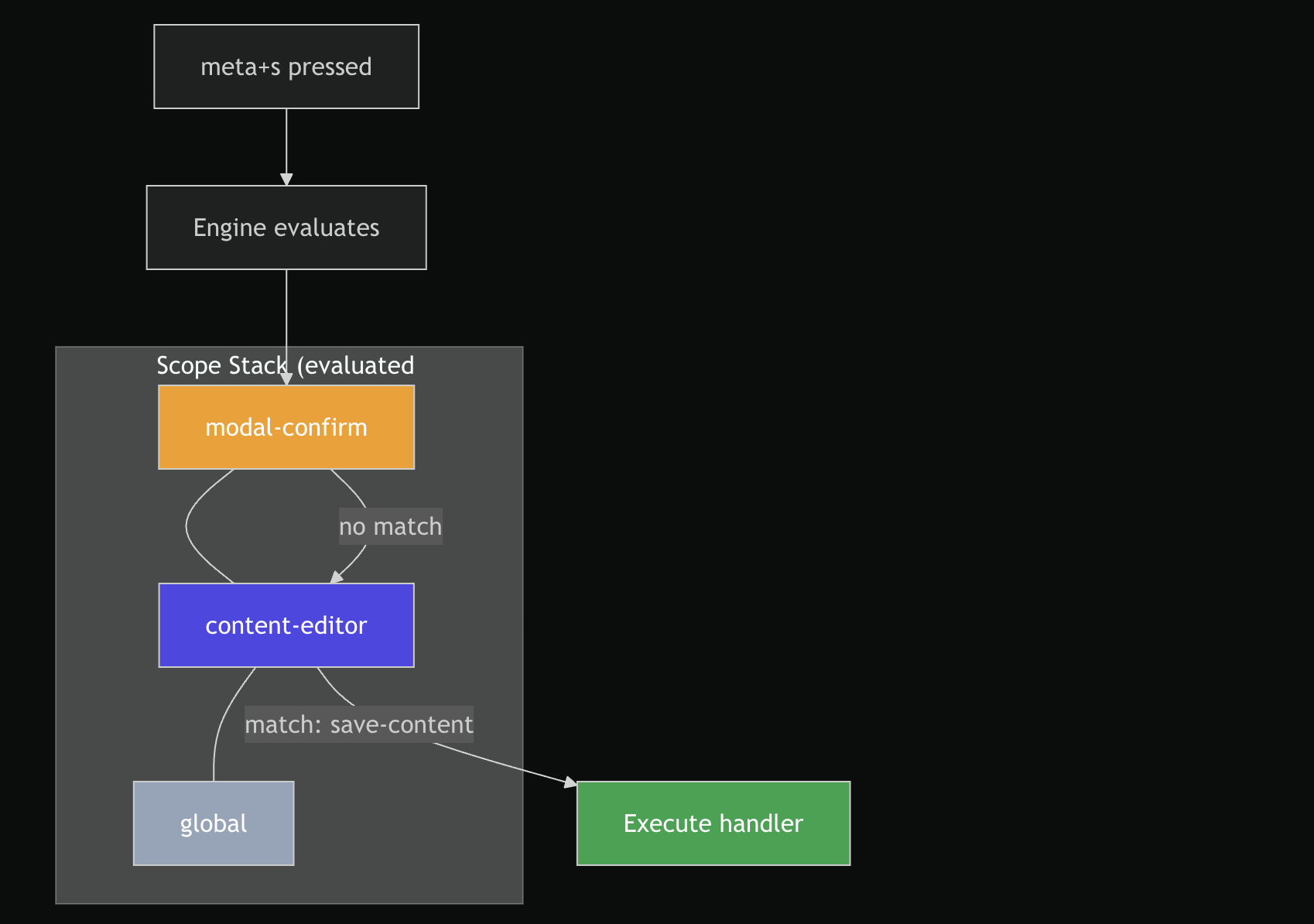
engine.pushScope('global');
engine.pushScope('content-editor');
engine.pushScope('modal-confirm');

// When the modal closes:
engine.popScope('modal-confirm');
popScope removes the last occurrence of the given scope (top-most match), not all occurrences. getStack() returns a defensive copy of the current stack.
4. Handle Keyboard Events
document.addEventListener('keydown', (event) => {
  engine.handleKeyEvent(event);
});
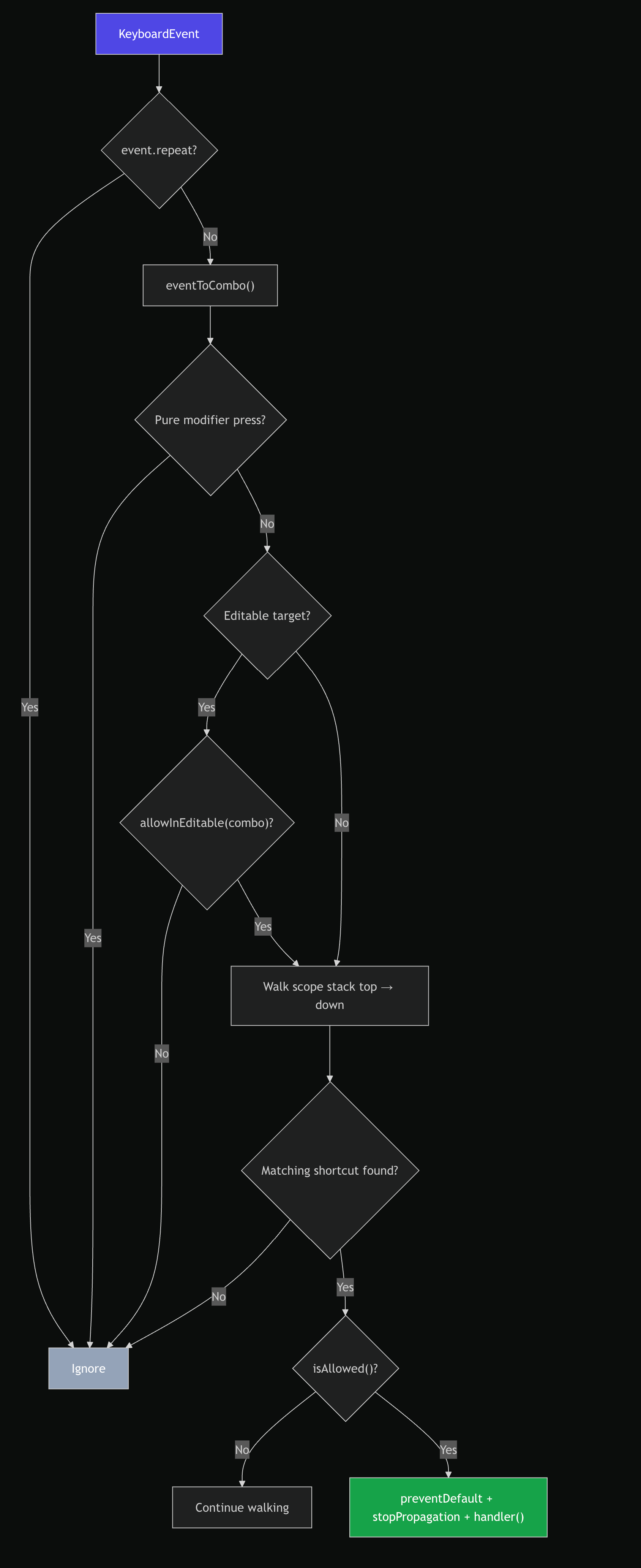
The engine processes each event through this pipeline:
Combo Normalization
eventToCombo() converts a KeyboardEvent into a deterministic string with modifiers in a fixed order:
meta → ctrl → alt → shift → key
The MODIFIER_ORDER constant enforces this ordering regardless of the order modifiers were pressed.
| Input | Normalized Combo |
|---|---|
| ⌘ + S | meta+s |
| Ctrl + Shift + P | ctrl+shift+p |
| Alt + 1 | alt+1 |
| Escape | escape |
| Spacebar | space |
Special key normalization: " " → space, Esc → escape. All keys are lowercased. Comparison via combosMatch() is case-insensitive.
Returns null (event ignored) when:
event.repeatistrue- The key is a pure modifier (
Meta,Control,Shift,Alt) - No non-modifier key is present
Gating: Feature Flags & Permissions
Every shortcut can optionally declare a featureFlag and/or permission. Before executing a matched shortcut, the engine calls:
function isAllowed(shortcut: RegisteredShortcut): boolean {
  if (shortcut.featureFlag) {
    if (!resolvers.featureFlagResolver) return false; // no resolver = blocked
    if (!resolvers.featureFlagResolver(shortcut.featureFlag)) return false;
  }
  if (shortcut.permission) {
    if (!resolvers.permissionResolver) return false; // no resolver = blocked
    if (!resolvers.permissionResolver(shortcut.permission)) return false;
  }
  return true;
}
This ensures shortcuts are invisible to users who don't have the required flags or permissions — they won't even appear in getActiveShortcuts().
getActiveShortcuts()
Returns all registered shortcuts that are currently allowed (pass both feature-flag and permission checks), walking the scope stack top → down. This is used by the UI to render a shortcut palette or help overlay.
const active = engine.getActiveShortcuts();
// → [{ id: 'save-content', combo: 'meta+s', description: '...', scope: '...', ... }]
The returned objects are ShortcutDefinition (no handler — the handler is not exposed).
Editable Target Detection
By default, the engine suppresses keyboard shortcuts when the focused element is:
- An
<input>or<textarea> - Any element with
isContentEditable === true - Any element with the
contenteditable="true"attribute
This prevents shortcuts from firing while the user is typing. The behavior can be selectively overridden by providing an allowInEditable function in the bootstrap resolvers — it receives the normalized combo string and returns true for combos that should still fire in editable contexts (e.g., Escape to close a modal even when focused on an input).
File Map
| File | Purpose |
|---|---|
engine.ts |
Factory + engine implementation (createShortcutEngine) |
registry.ts |
Map-based shortcut storage with scope filtering |
scopeStack.ts |
Push / pop / peek / getStack scope management |
comboMatcher.ts |
eventToCombo() and combosMatch() functions |
types.ts |
All exported types |
context.ts |
Reserved for future context utilities (currently empty) |
index.ts |
Re-exports createShortcutEngine and public types |
Design Decisions
- Factory pattern, not classes —
createShortcutEngine()returns a plain object with closures. This makes the engine easily testable and avoidsthisbinding issues in event handlers. - Overwrite-safe registration — calling
register()with an existingidsilently replaces the previous shortcut. This supports React effect cleanup/re-register cycles without requiring explicitunregisterfirst. - Missing resolver = blocked — if a shortcut declares a
featureFlagbut nofeatureFlagResolverwas provided at bootstrap, the shortcut is blocked (not allowed by default). This is a secure-by-default design. - Defensive stack copy —
getStack()returns a shallow copy of the stack array, preventing external mutation of internal state. stopPropagationon match — when a shortcut fires, bothpreventDefault()andstopPropagation()are called, ensuring no other listeners see the event.