Permissions
The Permission class wraps a NormalizedPermissionModel and provides intent-based access checks. Instead of scattering raw role comparisons across UI components, modules ask the permission object declarative questions like "can this user publish content?".
Data Model
The permission system is built on three type structures defined in the identity types module:
type AccessLevel = 'none' | 'read' | 'contributor' | 'write';

type ModuleKey =
  | 'admin'
  | 'subscriptions'
  | 'content'
  | 'customer_support'
  | 'app_cms'
  | 'apis'
  | 'intelligence'
  | 'dashboard_360';

interface NormalizedPermissionModel {
  modules: Record<ModuleKey, ModuleAccess>; // per-module access level
  contentScope: ContentScope; // contributor narrowing
  contentCapabilities: ContentCapabilities; // publish/archive flags
}

interface ContentScope {
  categories: string[];
  tags: string[];
  persons: string[];
  allowedUsers: string[]; // email whitelist for contributor narrowing
}

interface ContentCapabilities {
  publishUnpublish: boolean;
  archive: boolean;
  accessLevelVersion: 'v1' | 'v2' | 'v3' | 'v4';
}
RBAC Hierarchy
Roles are mapped to a strict numeric hierarchy. A higher level implies all lower levels.

| Level | Value | Meaning |
|---|---|---|
none |
0 | No access |
read |
1 | View-only access |
contributor |
2 | Can edit within scoped constraints |
write |
3 | Full read / write access on the module |
The has(module, requiredLevel) method returns true when the user's granted level for a given module is ≥ the required level. If the module entry is missing from the model, the granted level defaults to 'none'.
Intent Methods
Instead of checking raw hierarchy values, consumers call intent methods that encode business rules:
| Method | Returns true when… |
|---|---|
isAdmin() |
User has write access on the admin module |
canViewContent() |
User has read or above on the content module |
canEditContent(email?) |
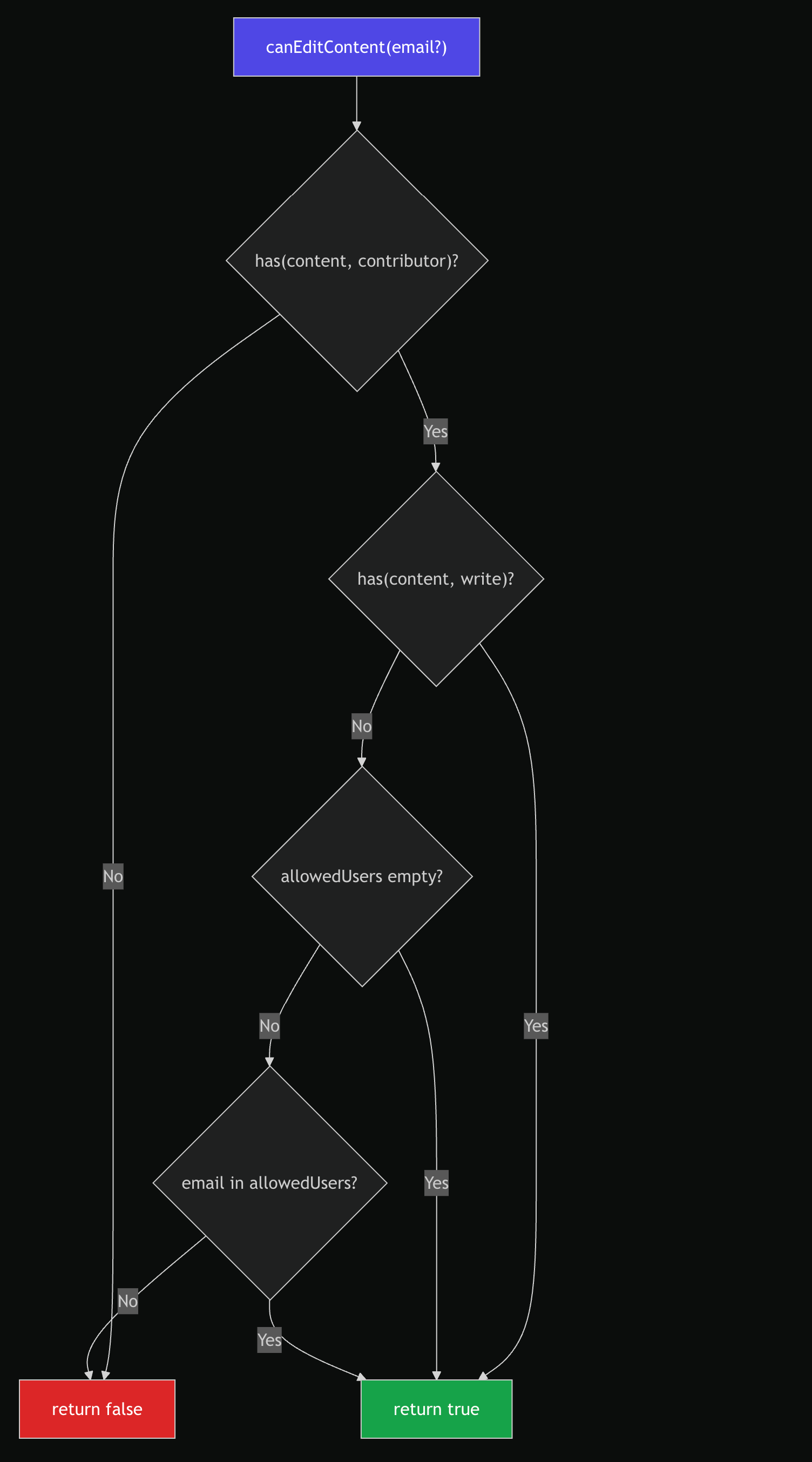
User has contributor+ on content. If contributor (not write), the allowedUsers list must be empty or contain the user's email |
canWriteContent() |
User has write on the content module |
canPublishContent() |
User has contributor+ on content and contentCapabilities.publishUnpublish is true |
canArchiveContent() |
User has contributor+ on content and contentCapabilities.archive is true |
canPublishContent() Decision Flow
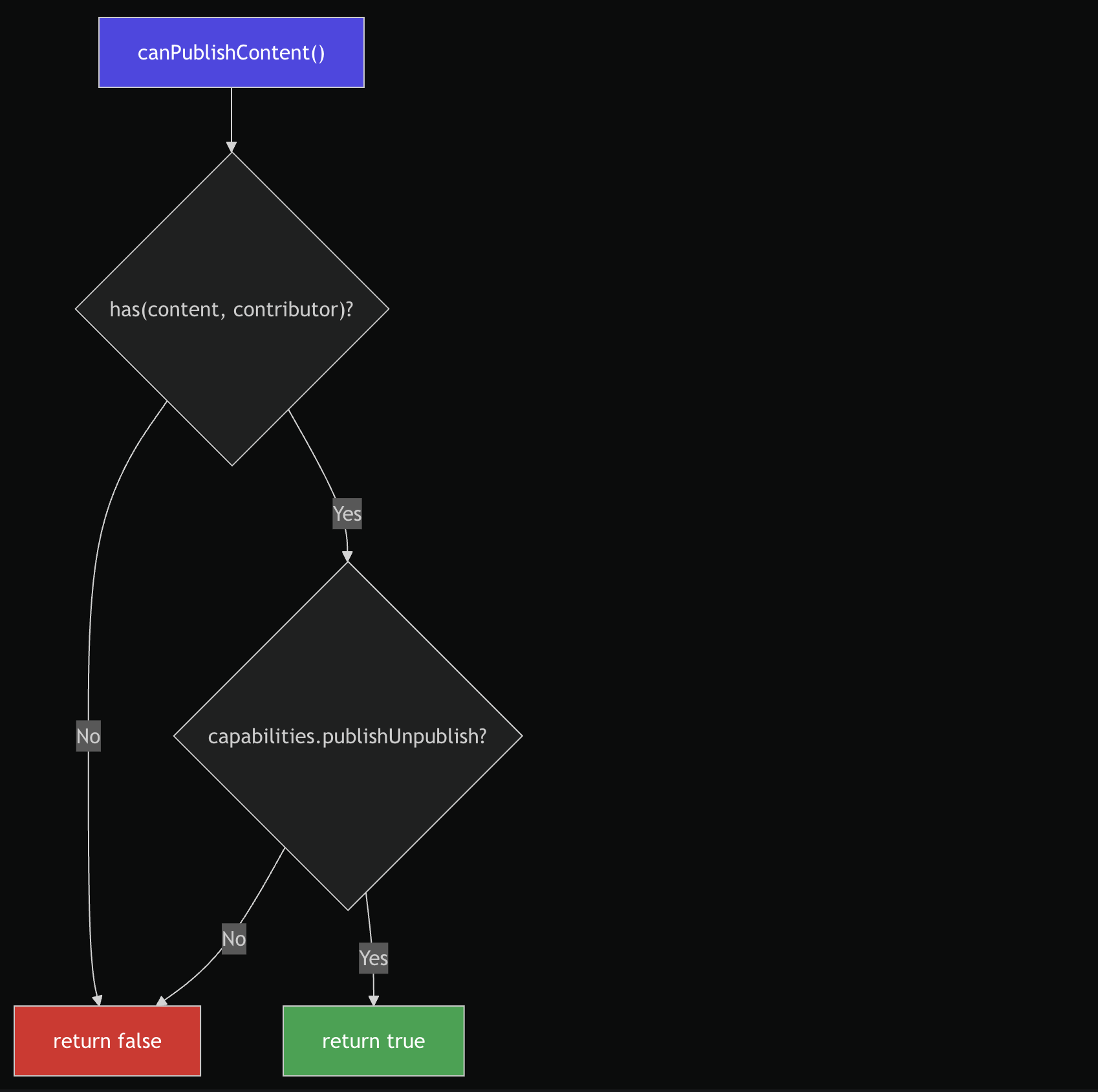
canArchiveContent() follows the same shape, checking capabilities.archive instead.
canEditContent() Decision Flow
Scoped Contributors
canEditContent(email?) demonstrates capability narrowing:
- Must have at least
contributorlevel oncontent— otherwise denied immediately. - If the user has
writelevel → allowed unconditionally. - If
allowedUsersis empty (no whitelist configured) → allowed. - If
allowedUsersis non-empty → allowed only if the user's email appears in the list.
This pattern ensures contributor access can be optionally scoped to specific users without introducing separate permission models.
API
import { Permission } from '@/lib/internal/Permission';

const perm = new Permission(normalizedModel);

// Hierarchy checks
perm.has('content', 'read'); // true if level ≥ read
perm.has('content', 'write'); // true if level ≥ write
perm.has('admin', 'write'); // true if admin access

// Intent checks
perm.canViewContent(); // read+
perm.canEditContent(user.email); // contributor+ (scoped)
perm.canWriteContent(); // write
perm.canPublishContent(); // contributor+ AND capability flag
perm.canArchiveContent(); // contributor+ AND capability flag
perm.isAdmin(); // write on admin module

// Debug access
perm.raw(); // returns the underlying NormalizedPermissionModel
Module Coverage
The ModuleKey type defines the eight gated areas of the CMS:
| Module Key | Typical Usage |
|---|---|
admin |
Platform administration, user management |
content |
Content CRUD, publish, archive workflows |
subscriptions |
Subscription and plan management |
customer_support |
Support ticket access |
app_cms |
App-level CMS configuration |
apis |
API key and endpoint management |
intelligence |
Analytics and intelligence dashboards |
dashboard_360 |
Overview dashboard access |
Design Decisions
- Hierarchy is implicit — a
writeuser automatically passesreadandcontributorchecks. No need to assign multiple roles. - Capabilities are orthogonal — having
contributor+ oncontentdoes not automatically grant publish/archive. Those require explicit capability flags from the backend. - Graceful defaults — missing module entries default to
'none'via optional chaining (this.model?.modules?.[module]?.access ?? 'none'). Missing capability flags default tofalse. raw()is for debugging only — UI components must never read the raw model directly. Always use intent methods.