Owned Pipeline
This is the active delivery mode. ONECMS owns every step — from injecting the GA4 script tag through to calling window.gtag(). The pipeline implements the contract defined in RFC-001: GA4 Event Contract
End-to-End Flow
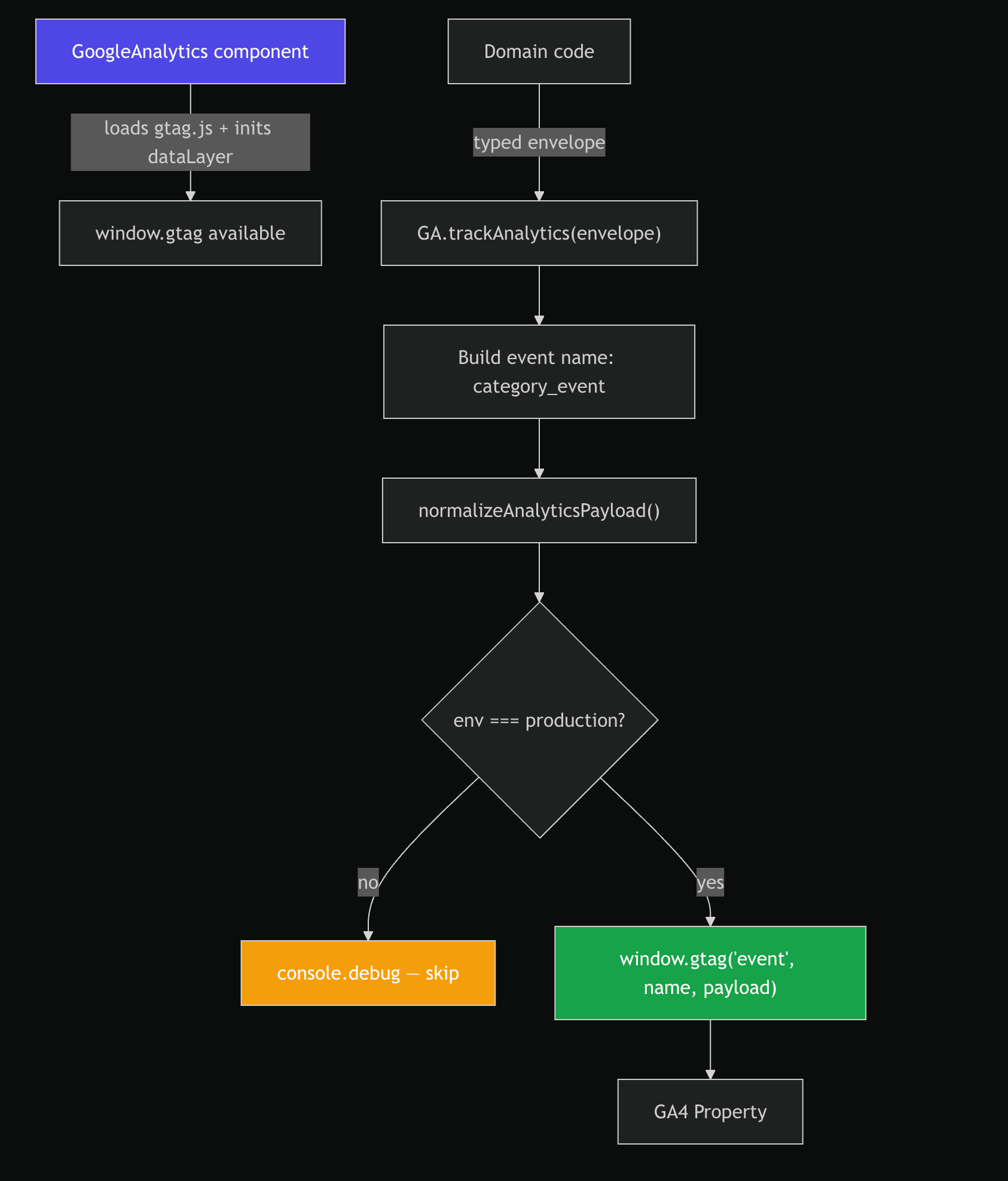
Script Injection
The GoogleAnalytics component is rendered in ClientWrapper (outside the auth boundary) and loads the GA4 script:
// src/modules/GoogleAnalytics.tsx
export default memo(function GoogleAnalytics({ measurementId }) {
  if (!measurementId) return null;
  return (
    <>
      <Script strategy="afterInteractive"
        src={`https://www.googletagmanager.com/gtag/js?id=${measurementId}`} />
      <noscript>
        <iframe src={`https://www.googletagmanager.com/ns.html?id=${measurementId}`}
          height="0" width="0" style={{ display: 'none', visibility: 'hidden' }} />
      </noscript>
      <Script id="google-analytics" strategy="afterInteractive">
        {`
          window.dataLayer = window.dataLayer || [];
          function gtag(){dataLayer.push(arguments);}
          gtag('js', new Date());
          gtag('config', '${measurementId}');
        `}
      </Script>
    </>
  );
});
Key details:
- Uses Next.js
<Script strategy="afterInteractive">— loads after hydration, does not block rendering noscriptiframe provides GTM fallback for non-JS environments- If
measurementIdis undefined (env var missing), the component renders nothing — no script loaded, no errors - Rendered once at the app shell level via
ClientWrapper
GA Transport
The GA class provides the public API for event emission:
// src/lib/external/GA.ts
export default class GA {
  private static track(event: string, payload: Record<string, unknown>) {
    if (typeof window === 'undefined' || !('gtag' in window)) return;
    window.gtag('event', event, payload);
  }

  static trackAnalytics(envelope: AllAnalyticsEnvelopes) {
    const eventName = `${envelope.category}_${envelope.event}`.toLowerCase();
    const finalPayload = normalizeAnalyticsPayload({
      ...envelope,
      schema_version: Config.GA.schema_version,
    });
    if (envelope.env !== 'production') {
      console.debug('[GA - Skipped in non-prod]', eventName, finalPayload);
      return;
    }
    this.track(eventName, finalPayload);
  }

  static updateGtagConsent(map: Record<GtagCategoryType, GAPermissionType>) {
    if (typeof window === 'undefined' || !('gtag' in window)) return;
    const consentUpdate = {
      analytics_storage: map.analytics === 'granted' ? 'granted' : 'denied',
    };
    window.gtag('consent', 'update', consentUpdate);
  }
}
Event Name Convention
Event names are derived as ${category}_${event}, lowercased (see RFC-001 §3: Event Naming Convention). For example:
| Category | Event | GA4 Event Name |
|---|---|---|
authentication |
login |
authentication_login |
customer_support |
customer_search |
customer_support_customer_search |
content |
upload_complete |
content_upload_complete |
Production Gating
trackAnalytics checks envelope.env (which comes from the caller's BaseEventContext). Non-production events are:
- Logged to console with
[GA - Skipped in non-prod]prefix - Never sent to
gtag
This prevents dev/staging data from polluting the GA4 property.
SSR Safety
track() guards against SSR with typeof window === 'undefined'. If gtag is not on window (script not loaded, ad blocker active), the call silently no-ops.
Payload Normalization
Before any event reaches gtag, it passes through the normalization adapter:
// src/adapters/analytics/normalizeAnalyticsPayload.adapter.ts
export function normalizeAnalyticsPayload(payload: Record<string, unknown>): Record<string, unknown> {
  const normalizedEntries = Object.entries(payload)
    .filter(([, value]) => value !== undefined) // strip undefined
    .map(([key, value]) => [key, normalizeValue(value)]);

  const limitedEntries = normalizedEntries.slice(0, param_limit); // enforce GA4 25-param limit
  return Object.fromEntries(limitedEntries);
}
| Rule | Default | Source |
|---|---|---|
Strip undefined values |
Always | Hardcoded |
| Truncate strings | 100 chars | Config.GA.string_char_limit |
| Join arrays to CSV | Always | Hardcoded |
| Limit total params | 25 | Config.GA.param_limit |
The normalization adapter is the single place where GA4's constraints are enforced. Domain code does not need to worry about limits.
Consent Management
GA4 tracking respects user consent via GA.updateGtagConsent():
static DefaultPermissionMap: Record<GtagCategoryType, GAPermissionType> = {
  analytics: 'denied',   // requires explicit opt-in
  necessary: 'granted',  // essential cookies
};
| Category | Default | Meaning |
|---|---|---|
analytics |
denied |
GA tracking disabled until user grants consent |
necessary |
granted |
Essential cookies always allowed |
When consent state changes (e.g., via CookieConsent module), updateGtagConsent sends a gtag('consent', 'update', ...) call to GA4.
Error Handling
Event emission is strictly fire-and-forget:
track()never throws — guarded by SSR andgtagexistence checks- No retry logic — failed events are dropped
- No queue — if
gtagis not available whentrack()is called, the event is lost - Non-production errors are visible in console via the debug log
This is intentional: analytics must never block or crash the UI.
Integration Point
GoogleAnalytics is rendered in ClientWrapper, which wraps the entire app:
ClientWrapper
  ├── Loader
  │   └── AuthContext → ... → children
  ├── GoogleAnalytics ← script injection here
  └── CookieConsent
The component sits outside the auth boundary, so the script loads regardless of authentication state. This allows anonymous page-level tracking (via gtag('config', ...)) before the user logs in.